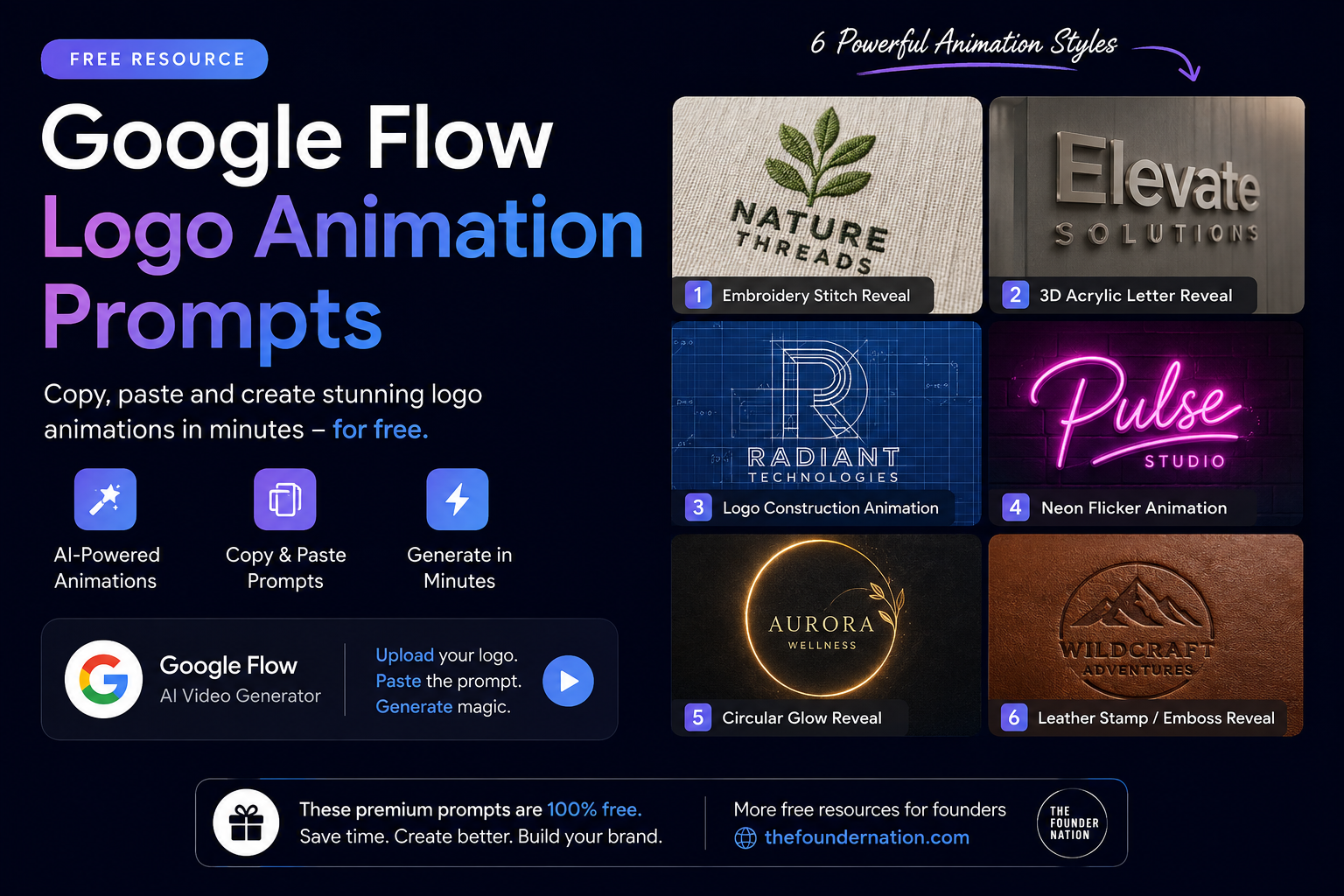
Create stunning AI logo animations in Google Flow for free.
Want to create premium logo reveal animations without using After Effects, Blender, or expensive animation software? You’re in the right place.
This page contains a collection of professionally crafted Google Flow logo animation prompts that help you generate cinematic logo reveals in just a few minutes. Simply upload your logo, copy the prompt, paste it into Google Flow, and let AI do the rest.
Whether you’re a startup founder, business owner, designer, freelancer, or content creator, these prompts can help you create eye-catching logo animations for websites, social media, YouTube intros, presentations, product launches, and advertisements.
✅ 100% Free
✅ Copy & Paste Ready
✅ No Animation Experience Required
What is Google Flow?
Google Flow is Google’s AI-powered video generation platform that allows users to create high-quality videos using simple text prompts.
Instead of spending hours animating logos manually, Google Flow can generate professional-looking animations from a single image and a well-written prompt.
This makes it an excellent tool for:
- Startup founders
- Small businesses
- Designers
- Agencies
- Marketing teams
- Personal brands
- YouTube creators
- Content creators
With the right prompt, Google Flow can generate realistic logo reveals, neon animations, embroidery effects, blueprint construction animations, 3D logo reveals, and much more.
How to Use These Prompts
Using these prompts is simple.
Step 1
Open Google Flow.
Step 2
Upload your logo.
For best results:
- PNG format
- Transparent background
- High resolution
- Centered logo
Step 3
Copy one of the prompts below.
Step 4
Paste it into Google Flow.
Step 5
Generate your animation.
If you don’t like the first output, generate again. AI outputs improve after a few attempts.
1. Embroidery Stitch Logo Reveal
Perfect for:
- Clothing Brands
- Fashion Labels
- Luxury Brands
- Merchandise
- Streetwear
- Handmade Businesses
Prompt
Extreme macro shot of woven cotton shirt fabric, empty at first. Colored
embroidery threads rise from the surface and weave themselves into place,
laying down tight satin stitches row by row, tracing out the logo. The
stitched area grows steadily across the frame, thread pulling taut and
raising into dimensional embroidered texture, until the full logo is
complete. Camera holds steady, slow satisfying timelapse pace. Soft
natural side light, shallow depth of field, visible fabric fibers and
realistic thread sheen. No hands, thread moves on its own. One shot no scene change.
Don’t crop the logo!
Tips
✔ Upload a transparent PNG
✔ Works best with simple logos
✔ Use high-resolution logos
✔ Don’t crop the logo
2. 3D Acrylic Letter Logo Reveal
Perfect for:
- Agencies
- Corporate Businesses
- SaaS Companies
- Real Estate
- Architecture
- Tech Brands
Prompt
Used for logos made of raised 3D acrylic letters mounted on a wall — the reveal is an extrude/pop-out effect.
This is a VFX reveal effect on a static scene, not a redesign or regeneration of the scene. The camera
position, angle, and framing stay exactly the same as the uploaded reference image throughout the entire
clip. The only thing that animates is the logo itself appearing gradually in its exact original place — everything
else in the frame (background, surface, lighting) stays fixed and unchanged, like a motion graphics overlay
on a still photo. The final frame should look identical to the uploaded reference image.
[0:00-0:02] Start with the wall panel empty, no logo present. Slight camera zoom-in begins, a gentle and
minimal movement.
[0:02-0:04] The primary script-style wordmark extrudes/pops out from flat against the wall into its full 3D
raised depth, letters building into place from left to right, with a soft drop shadow forming as it extrudes
outward.
[0:04-0:06] The secondary text extrudes the same way, positioned below and to the side of the primary
wordmark.
[0:06-0:10] Logo fully extruded and in place, matching the reference image. Camera continues its slight
zoom-in and holds until the end.
Negative prompt: Do not change the camera angle or framing beyond the specified push-in. Do not change
where the logo sits in the frame. Do not add extra text or objects. No sudden cuts or transitions. No talking,
exactly 10 seconds.
Best Use Cases
Website Hero Sections
Office Branding
YouTube Intros
Corporate Videos
Presentations
3. Premium Logo Construction Animation
This is one of the most impressive prompts in this collection.
Instead of simply revealing your logo, it creates the illusion that your logo is being engineered by a professional designer using construction grids, measurement guides, Bézier curves, anchor points, vector paths, and blueprint systems before revealing the finished logo.
Perfect for:
- Technology Companies
- Design Studios
- Branding Agencies
- Software Companies
- Personal Brands
- Premium Businesses
Prompt
Reference Image: @image1
Task:
Create a world-class premium Logo Construction Animation using ONLY the supplied reference logo (@image1). The animation should feel like the logo is being intelligently engineered, mathematically constructed, and precisely manufactured before transforming into the final finished brand mark.
This is NOT a simple logo reveal.
This is a complete logo construction sequence where invisible geometry, grids, guides, vectors, alignment systems, measurement lines, anchor points, Bézier curves, precision circles, spacing systems, and construction guides gradually build the uploaded logo exactly as if a professional logo designer is creating it from scratch inside Adobe Illustrator or another professional vector design application.
Before animating, carefully analyze the uploaded logo and identify:
• Typography
• Icon or Symbol
• Monogram
• Lettermark
• Wordmark
• Combination Mark
• Emblem
• Negative Space
• Grid Relationships
• Geometric Construction
• Visual Hierarchy
• Spacing System
• Alignment
• Symmetry
• Curves
• Angles
• Brand Colors
Use this analysis to determine the most natural construction sequence.
If the logo contains an icon and text, construct the icon first, followed by the typography.
If the logo contains only typography, construct each character individually.
If the logo contains only an icon, construct every geometric component before revealing the completed mark.
Every construction decision should be logically derived from the uploaded logo.
The final frame MUST be an exact pixel-perfect recreation of the uploaded reference logo.
Absolutely NO:
• Redesign
• Font substitution
• Re-interpretation
• Shape modification
• Color modification
• Additional graphics
• Stylization
• Creative redesign
The uploaded logo (@image1) is the ONLY source of truth.
—————————————————-
GENERAL STYLE
—————————————————-
Ultra Premium
Modern Motion Graphics
Apple Design Process
Behance Featured Animation
Studio Quality
Corporate
Minimal
Luxury
Technology
Engineering
Architectural
Mathematical Precision
Swiss Design
Vector Blueprint
Professional
—————————————————-
VIDEO SETTINGS
—————————————————-
Duration:
8–10 Seconds
Resolution:
4K UHD
Aspect Ratio:
16:9
Background:
Pure White (#FFFFFF)
Frame Rate:
120fps Smooth Motion
Camera:
Very slow cinematic push-in with almost invisible movement.
Lighting:
Soft premium studio lighting.
Subtle ambient reflections.
No dramatic shadows.
—————————————————-
SCENE 1 — EMPTY CANVAS
—————————————————-
Begin with a completely white background.
Tiny floating dust particles.
Soft ambient lighting.
A faint center glow slowly appears.
Very thin gray blueprint guides fade in.
Everything feels handcrafted and premium.
—————————————————-
SCENE 2 — DESIGN GRID EMERGES
—————————————————-
Reveal an advanced logo construction system.
Depending on the uploaded logo, intelligently generate:
• Baseline
• Cap Height
• X-height
• Vertical Guides
• Horizontal Guides
• Modular Grid
• Safe Area
• Margins
• Alignment Guides
• Measurement Ticks
• Symmetry Guides
• Construction Circles
• Tangents
• Radius Guides
• Intersection Lines
• Golden Ratio (only if naturally applicable)
• Modular Geometry (only if naturally applicable)
The construction system should adapt naturally to the uploaded logo.
Never force circles where they are unnecessary.
Never overcomplicate simple logos.
—————————————————-
SCENE 3 — GEOMETRY ANALYSIS
—————————————————-
The uploaded logo begins to reveal its mathematical structure.
Construction circles slide into position.
Anchor points appear.
Bezier handles rotate.
Measurement values briefly display.
Guide lines intersect.
Vector paths become visible.
The logo appears to be engineered using professional vector geometry.
Every movement feels mechanically precise.
No random animation.
Everything follows logical geometric progression.
—————————————————-
SCENE 4 — ICON / SYMBOL CONSTRUCTION
—————————————————-
If the uploaded logo contains an icon:
Construct it first.
Reveal it using:
• Vector outlines
• Construction circles
• Bézier curves
• Anchor points
• Tangents
• Geometric intersections
Every component locks perfectly into place.
Only after its geometry is complete should the icon fill with its original colors.
Maintain:
Original gradients
Original colors
Original proportions
Original curves
Original spacing
Original geometry
If no icon exists, skip this section automatically.
—————————————————-
SCENE 5 — TYPOGRAPHY CONSTRUCTION
—————————————————-
Construct the typography after the icon.
Each letter is built individually.
Reveal using:
Thin vector outlines
Anchor points
Bezier handles
Construction guides
Grid alignment
Corner snapping
Curve construction
Each character fills only after its outline is complete.
Preserve:
Original font
Original weight
Original spacing
Original kerning
Original colors
Original proportions
If multiple words exist, intelligently determine their reveal order.
—————————————————-
SCENE 6 — SECONDARY ELEMENTS
—————————————————-
If the uploaded logo contains:
Tagline
Divider
Underline
Graphic accents
Secondary icon
Badge
Trademark
Descriptor
Reveal them after the primary logo using the same construction principles.
If none exist, skip this stage automatically.
—————————————————-
SCENE 7 — BLUEPRINT TO BRAND
—————————————————-
The logo is now fully assembled.
Construction circles fade away.
Measurement numbers disappear.
Anchor points dissolve.
Bezier handles retract.
Grid lines fade.
Guides disappear.
Only the completed logo remains.
—————————————————-
SCENE 8 — PREMIUM FINISH
—————————————————-
A soft diagonal studio light sweeps across the completed logo once.
Very subtle.
Elegant.
Premium.
No chrome.
No metallic reflections.
No excessive glow.
Only premium studio lighting.
Tiny dust particles slowly disappear.
—————————————————-
FINAL FRAME
—————————————————-
Hold on the completed logo.
Everything becomes perfectly still.
No construction guides remain.
No glow.
No blur.
No particles.
No distortion.
No additional effects.
Only the completed uploaded logo remains centered on the white background.
The final frame must be visually indistinguishable from the uploaded reference image.
—————————————————-
MOTION QUALITY
—————————————————-
Ultra Smooth
120fps Quality Motion
Physically Accurate Easing
Micro Animation
High-End Motion Graphics
Precision Timing
No Bounce
No Elastic Motion
No Overshoot
No Random Camera Shake
No Fast Cuts
Everything should feel handcrafted by an elite motion graphics designer.
—————————————————-
STRICT REQUIREMENTS
—————————————————-
• Use ONLY the uploaded reference logo (@image1).
• Analyze the logo before animating and adapt the construction sequence to its structure.
• Never redraw, redesign, reinterpret, or simplify the logo.
• Preserve the exact typography, icon geometry, colors, gradients, spacing, proportions, stroke thickness, alignment, and overall composition.
• Maintain every visual detail exactly as shown in the uploaded logo.
• Construction grids, blueprint lines, circles, Bézier handles, anchor points, rulers, measurement values, and guides are temporary animation elements only and must disappear before the final hold.
• Never introduce design elements that are not naturally implied by the uploaded logo.
• The animation should feel handcrafted by a world-class branding studio, combining mathematical precision, engineering aesthetics, and premium motion design.
• The final frame must be a pixel-perfect recreation of the uploaded logo, making it suitable for websites, mobile apps, software splash screens, investor presentations, brand films, product launches, and premium corporate identity systems.
Why This Prompt Looks Premium
This animation simulates the professional logo design process used by branding agencies.
Instead of a normal reveal, viewers watch the logo being mathematically constructed before becoming the final brand mark.
This style is commonly seen in:
- Apple presentations
- Branding case studies
- Behance showcases
- Motion graphics portfolios
4. Neon Logo Flicker Animation
Perfect for:
Gaming
Restaurants
Bars
Nightclubs
Content Creators
Modern Brands
Prompt
This is a VFX reveal effect on a static scene, not a redesign or regeneration of the scene. The camera
position, angle, and framing stay exactly the same as the uploaded reference image throughout the entire
clip. The only thing that animates is the sign itself appearing gradually in its exact original place — everything
else in the frame (background, surface, lighting) stays fixed and unchanged, like a motion graphics overlay
on a still photo. The final frame should look identical to the uploaded reference image.
[0:00-0:02] Start with the signboard empty, no lettering present. Slight camera tilt left and right begins, a
gentle and minimal side-to-side motion.
[0:02-0:06] Lettering flickers on one letter at a time from left to right, like a backlit signboard powering on,
each letter flickering once or twice before settling into a steady lit state.
[0:06-0:10] Signboard fully lit and steady, matching the reference image. Camera continues its slight tilt left
and right and holds until the end.
Negative prompt: Do not change the camera angle or framing beyond the specified pan. Do not change
where the sign sits in the frame. Do not add extra text or objects. No sudden cuts or transitions. No talking,
exactly 10 seconds.
Tips
Works best with logos that contain glowing elements.
Avoid using very thin typography.
5. Circular Glow Logo Reveal
Perfect for:
Coffee Brands
Food Brands
Luxury Businesses
Hotels
Salons
Restaurants
Premium Products
Prompt
This is a VFX reveal effect on a static scene, not a redesign or regeneration of the scene. The camera
position, angle, and framing stay exactly the same as the uploaded reference image throughout the entire
clip. The only thing that animates is the logo itself appearing gradually in its exact original place — everything
else in the frame (background, surface, lighting) stays fixed and unchanged, like a motion graphics overlay
on a still photo. The final frame should look identical to the uploaded reference image.
[0:00-0:02] Start with the circular sign empty, no emblem present. Slight camera zoom-in begins, a gentle
and minimal movement.
[0:02-0:03] The circular background glows softly into visibility from the center outward, like a backlit sign
powering on.
[0:03-0:06] The emblem lines draw themselves in with a soft glowing edge, from the center outward, as if
illuminated from within the sign.
[0:06-0:10] Logo fully lit and in place, matching the reference image. Camera continues its slight zoom-in and
holds until the end.
Negative prompt: Do not change the camera angle or framing beyond the specified push-in. Do not change
where the badge sits in the frame. Do not add extra text or objects. No sudden cuts or transitions. No talking,
exactly 10 seconds.
Best Results
Use logos with circular badges or emblem designs.
6. Leather Stamp / Emboss Reveal
Perfect for:
Leather Goods
Fashion
Luxury Brands
Travel Brands
Handmade Products
Craft Businesses
Prompt
This is a VFX reveal effect on a static scene, not a redesign or regeneration of the scene. The camera
position, angle, and framing stay exactly the same as the uploaded reference image throughout the entire
clip. The only thing that animates is the sign itself appearing gradually in its exact original place — everything
else in the frame (background, surface, lighting) stays fixed and unchanged, like a motion graphics overlay
on a still photo. The final frame should look identical to the uploaded reference image.
[0:00-0:02] Start with the wall area empty, no sign present. Slight camera tilt left and right begins, a gentle
and minimal side-to-side motion.
[0:02-0:03] The patch shape stamps/embosses itself onto the wall in one motion, like a leather patch being
pressed into place, its edges and curved bottom settling into their final shape.
[0:03-0:06] The wordmark and any symbol emboss/stamp into the patch surface the same way, appearing as
if pressed/debossed into the leather.
[0:06-0:10] Sign fully in place, matching the reference image. Camera continues its slight tilt left and right and
holds until the end.
Negative prompt: Do not change the camera angle or framing beyond the specified pan. Do not change
where the sign sits in the frame. Do not add extra text or objects. No sudden cuts or transitions. No talking,
exactly 10 seconds.
Best Practices for Better Results
The quality of your animation depends on the quality of your uploaded logo.
Follow these tips:
- Use PNG instead of JPEG.
- Upload the highest resolution possible.
- Keep the logo centered.
- Avoid blurry images.
- Use transparent backgrounds whenever possible.
- Generate multiple versions before selecting your favorite.
Common Mistakes
Many people think AI isn’t good because they make these mistakes.
❌ Uploading low-resolution logos
❌ Cropping the logo
❌ Using screenshots instead of original files
❌ Ignoring transparent backgrounds
❌ Expecting the first generation to be perfect
Remember, AI generation is iterative.
Frequently Asked Questions
Google periodically offers free access depending on availability and your region. Check Google’s latest pricing and availability before using it.
Yes, although simple and high-resolution logos usually produce the best results.
PNG with a transparent background.
If supported, yes. Otherwise export your SVG as a high-resolution PNG.
Always review Google’s terms of use for commercial usage rights.
It depends on your brand.
Fashion → Embroidery
Tech → Blueprint
Corporate → Acrylic
Gaming → Neon
Luxury → Emboss
Restaurants → Circular Glow